What is MCP? A plain English guide to the Model Context Protocol
MCP is a common way for AI agents to find and use tools. What it is, why products should offer agent ready tools next to their API, and how Roberto uses it.
Your team already lives in a dozen tools. Calendar, CRM, docs, billing, support. An AI agent is only as useful as the tools it can reach.
For years, every AI app had to build its own connector for every tool. Ten AI apps and fifty tools meant five hundred integrations, each a little different, each breaking in its own way.
The Model Context Protocol, or MCP, is a growing answer to that problem. The official docs describe it as an open source standard for connecting AI applications to external systems. Their analogy is a good one: MCP is like a USB-C port for AI apps. One common plug instead of a drawer full of adapters.
This guide explains MCP in plain English, shows why products should offer agent ready tools next to their APIs, and walks through how Roberto uses it today.
MCP in one minute
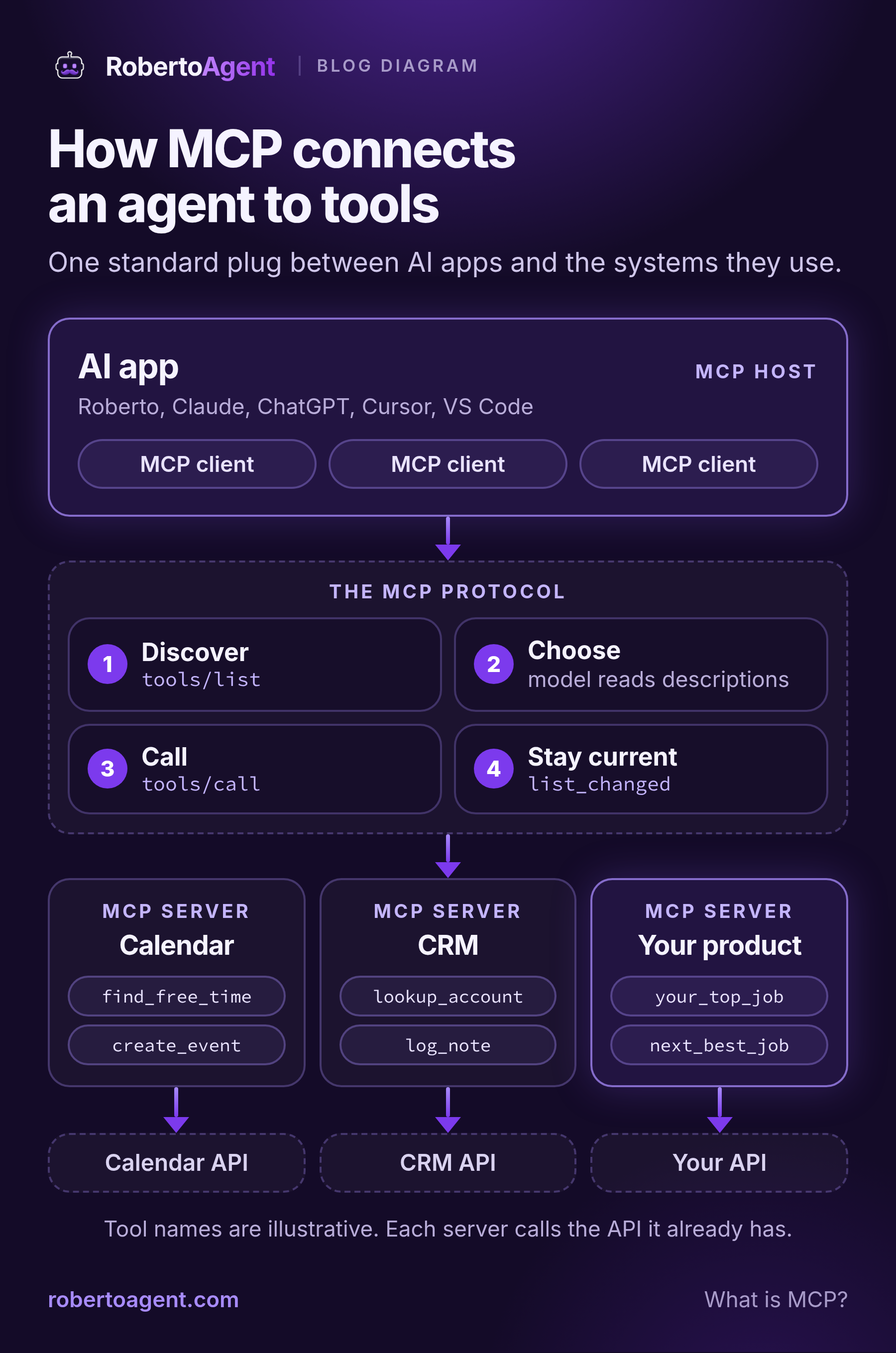
MCP has three roles. The names sound technical. The ideas are not.
A server can offer three kinds of things. The architecture docs call them primitives.
A tool call follows the same four steps every time.
- Discover. The app asks the server what tools it has. Each tool comes back with a name, a description, and a schema for its inputs.
- Choose. The model reads those descriptions and picks the right tool for your request.
- Call. The app sends the tool name and arguments. The server does the work and returns a result.
- Stay current. When the server's tools change, it can notify connected apps so they refresh their list.
A practical example
You type: "Find 30 minutes with Dana next week and send her the pitch deck."
Without MCP, someone has to wire the calendar API, the email API, and the file API into that one AI app. Then do it again for the next AI app your team adopts.
With MCP, the calendar, email, and file products each run an MCP server once. Any AI app that speaks MCP can discover tools like find_free_time, create_event, and send_email, then call them in order. The tool names here are illustrative. The pattern is the point.
Here is what that could look like across a few kinds of products.
Why MCP is catching on
MCP solves a coordination problem. A product team builds one server, and every MCP aware AI app can use it. An AI app supports MCP once, and it can reach every server its users connect.
The official docs list support across AI assistants like Claude and ChatGPT and developer tools like VS Code and Cursor, with many more beyond those. That is why it is becoming a common integration layer for agents.
It is not universal. Plenty of apps do not speak MCP, and not every product needs a server tomorrow. But the list of clients that do is long enough to take seriously.
MCP does not replace your API
This is the part most explainers skip.
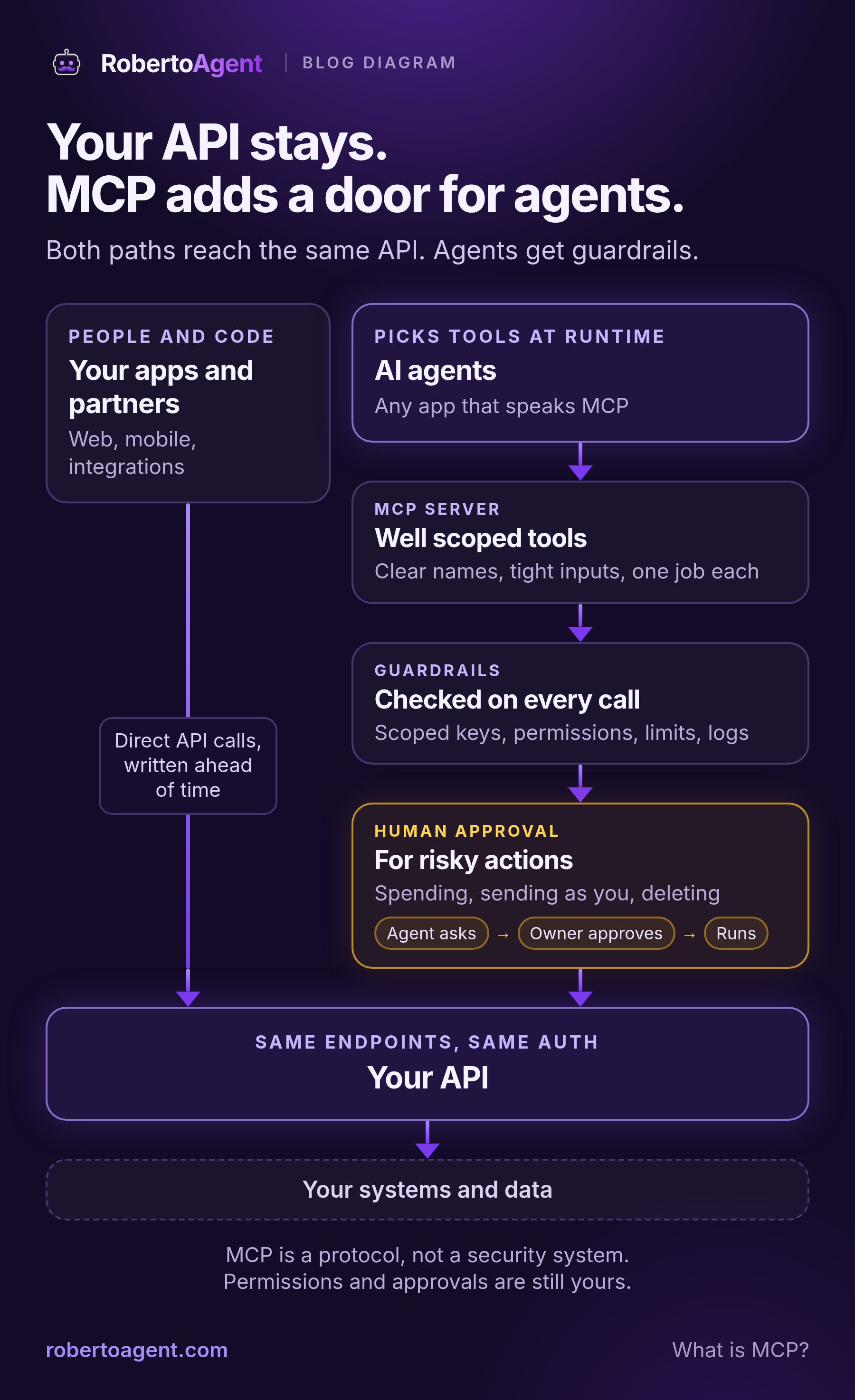
Your API is built for developers. They read the docs, write code ahead of time, and call exact endpoints. An agent works differently. It picks tools at runtime, based only on their names and descriptions.
So MCP sits on top of your API, not in place of it. Your web app, your mobile app, and your partners keep calling the API directly. Agents get a thin layer of tools shaped for them. Under the hood, most tools just call the API you already have.
Agent ready tools share four traits.
- Task shaped names.
refund_order, notPOST /v2/txn/adjust. - Tight inputs. A schema that says exactly what each argument is and which ones are required.
- Narrow scope. One job per tool. Reading is separate from writing.
- Useful results. Short answers the model can use, and errors that say how to fix the call.
Security is still your job
MCP is a protocol, not a security system. It defines how an AI app and a server talk. It does not decide who should be allowed to do what.
The spec is direct about this. For trust and safety, it says there should always be a human in the loop with the ability to deny tool invocations, and that apps should ask for confirmation on sensitive operations. It also says servers must validate inputs, enforce access controls, rate limit calls, and sanitize outputs. The security best practices add more, including least privilege scopes and never passing a user's token straight through to another service.
In practice, that means five habits.
- Give each agent its own credential, scoped to the least it needs.
- Keep secrets on the server. The agent asks for an action. It never holds your API keys.
- Check permissions on every call, not just when the agent first connects.
- Put a human approval in front of anything that spends money, sends on someone's behalf, or deletes data.
- Rate limit and log every call, so you can see what agents actually do.
How Roberto uses MCP
Roberto is built on MCP in both directions. Our agents use it to reach their tools, and other agents can use it to reach Roberto.
Roberto runs its own MCP server. Roberto agents connect to an MCP server that runs on the Roberto API over Streamable HTTP, the transport MCP uses for remote servers.
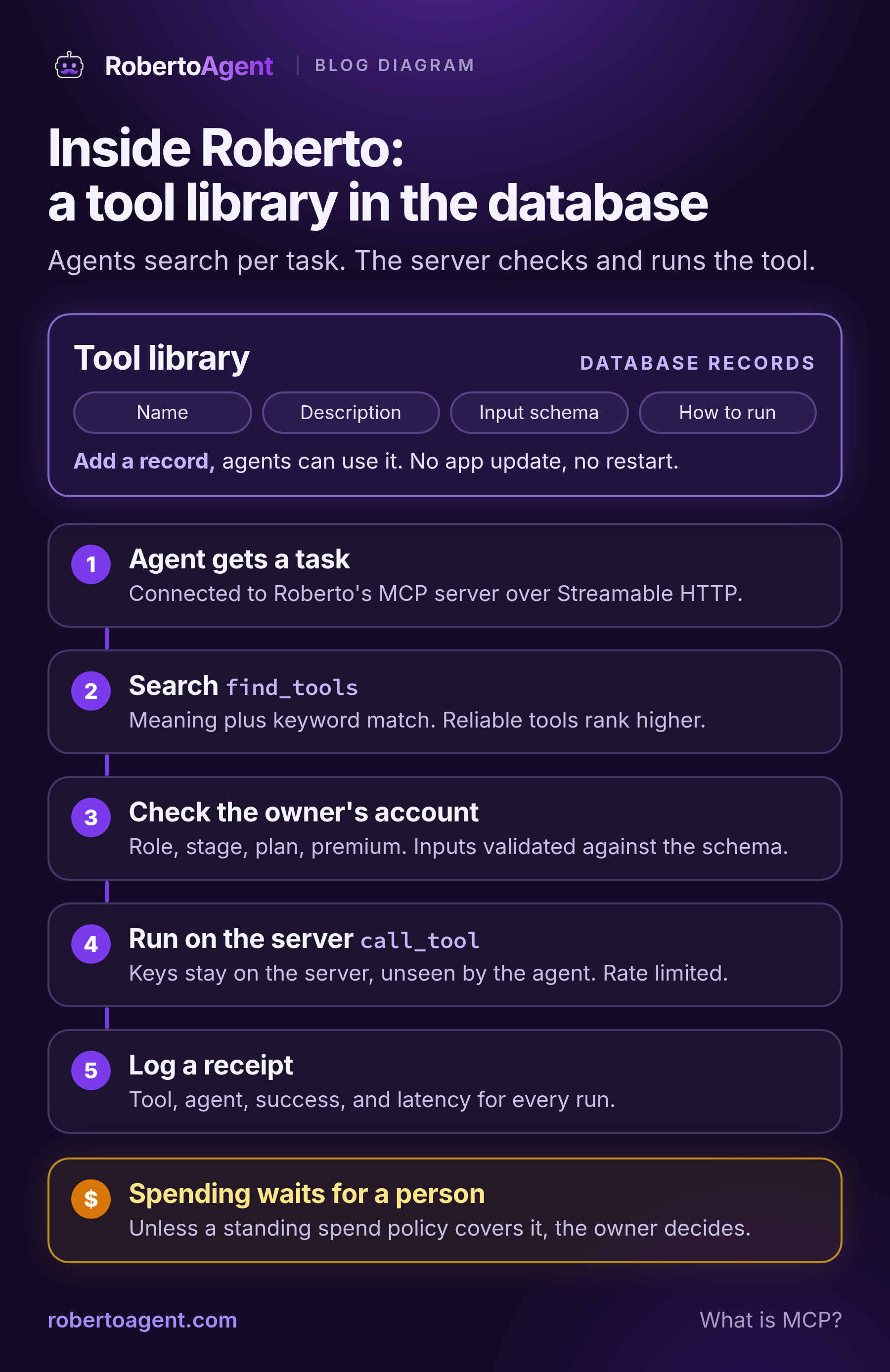
The tool library lives in a database. Each tool is a record with a name, a description, an input schema, and instructions for how to run it. Adding a record makes the tool available to agents. No new app release, no new container, no restart.
Agents search instead of scrolling a giant menu. The server advertises a small core set of tools plus a few helpers. The long tail is found per task. find_tools searches the library with both meaning and keyword matching, and call_tool runs the match. Shared playbooks work the same way through find_skills and get_skill. The MCP docs recommend this progressive discovery pattern for large tool sets, because loading every tool into the model up front wastes context.
Reliable tools rise. Search results blend relevance with each tool's recent success. Tools that keep failing sink and get flagged.
Every call is checked. Before a tool runs, the server checks it against the agent owner's account: role, rollout stage, plan, and whether premium tools are unlocked. It validates the arguments against the tool's schema. A locked tool can still be found, with a plain reason the agent can pass on, like needing a credit pack.
Secrets stay on the server. Many tools are simple HTTP calls described as data. The server fills in API keys at the moment of the call, applies timeouts and per agent rate limits, and scrubs keys from any error. The agent never sees them.
Every call leaves a receipt. Each run is logged with the tool, the agent, whether it worked, and how long it took.
Changes reach live sessions. When the set of tools an agent can use changes, the server sends MCP's standard "tool list changed" notice so connected agents refresh.
Money moves wait for a person. When an agent wants to spend for its owner, it files a request. Unless the owner has set a standing spend policy that covers it, the request waits for the owner to approve or deny. Approving needs a fresh sign in check, and requests expire.
Other agents can connect to Roberto. On Pro and higher plans, Roberto hosts an MCP server at robertoagent.com/mcp. A personal agent from another app connects with its own scoped, revocable credential, with OAuth for clients that need it. It can report work, ask the owner a question, or hand Roberto a goal. A handed off goal waits until the owner approves it.
Developers get a local MCP server too. The @robertoagent/mcp package wraps existing Roberto API routes as MCP tools. Its agents_list tool calls GET /api/agents, the same endpoint the web app uses. That is the "MCP next to your API" idea in one package.
Should your product have an MCP server?
Not every product needs one today. It is a strong fit when customers already try to automate your product, when the key actions are well defined, and when you have a solid API and permissions model to build on.
If that is you, start small.
- Pick the three to five jobs customers do in your product every week.
- Wrap each one as a single tool with a clear name, description, and schema that calls your existing API.
- Start with read only tools. Add write tools behind scopes and confirmations.
- Log every call. Watch which tools agents pick, and which ones fail.
- Publish the server next to your API docs, so customers can connect the AI apps they already use.
Quick answers
Is MCP an API? It is a protocol that sits in front of APIs. An MCP server usually calls a normal API under the hood.
Does MCP replace REST APIs? No. Your apps and partners keep using the API. MCP adds a layer shaped for agents.
Is MCP secure? MCP defines the conversation, including how remote servers can use OAuth. Permissions, approvals, rate limits, and logging are still up to the people who build the server and the app.
Do I need to know MCP to use Roberto? No. Roberto handles the plumbing. You ask for the outcome, and Roberto finds the right tool, checks it, and runs it.
Sources
- What is the Model Context Protocol? MCP docs
- Architecture overview MCP docs
- Tools, specification 2026-07-28 MCP docs
- Client best practices: progressive tool discovery MCP docs
- Security best practices MCP docs
- Roberto MCP reference Roberto docs
Want this working in your company?
We build and run the agents. Tell Roberto what you want off your desk.
Talk to RobertoGet new posts by email
Occasional notes from Roberto Agent.